
employees at a small business

Manage your business account with My Account

Enroll now

My Account keeps everything you need to manage your energy in one convenient place.


With My Account, you can:

  • Pay your bill with a credit/debit card or savings/checking account.
  • View your energy usage over the past 13 months.
  • Set up high-usage alerts.
  • Receive billing and outage notifications by email, text or phone.
  • View and report power outages.
  • Enroll in billing and payment programs.
  • Set up guest users and grant them various levels of access. 

What you need to get started: Your Alliant Energy account number and the last four digits of your federal tax ID number or Social Security number.

Enroll now

Energy Analytics: Only through My Account

Energy Analytics is an online tool that gives you deeper insights into your business's energy usage, helping you make smart, data-driven decisions.

With Energy Analytics, you can:

  • Understand, visualize and manage your business's energy consumption. 
  • Gain key insights into your facility's energy use.
  • Visualize and compare your energy usage and costs over time to identify trends.
  • See how weather influences your usage to help predict and plan for the seasons.
  • Access tailored solutions to reduce consumption and costs.
Warehouse worker on the phone

How to access Energy Analytics through My Account


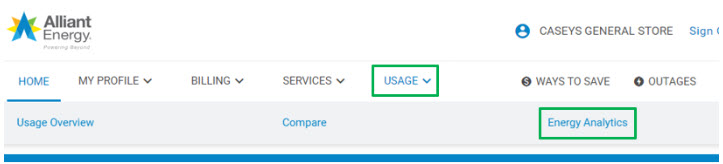
screenshot of My Account

  1. Sign in to My Account.
  2. “Select “Usage” and then “Energy Analytics.”
  3. Review the Energy Analytics quick start guide [PDF].
Guest user access

If someone at your business is already enrolled in My Account, they can invite you as a guest user. You’ll get all the functionality of Energy Analytics. You can also add or manage existing accounts to your My Account profile.

Questions? Contact the Business Resource Center at 1-866-ALLIANT (866-255-4268).

Enroll now

Recent stories from our blog